
Geofence configuration
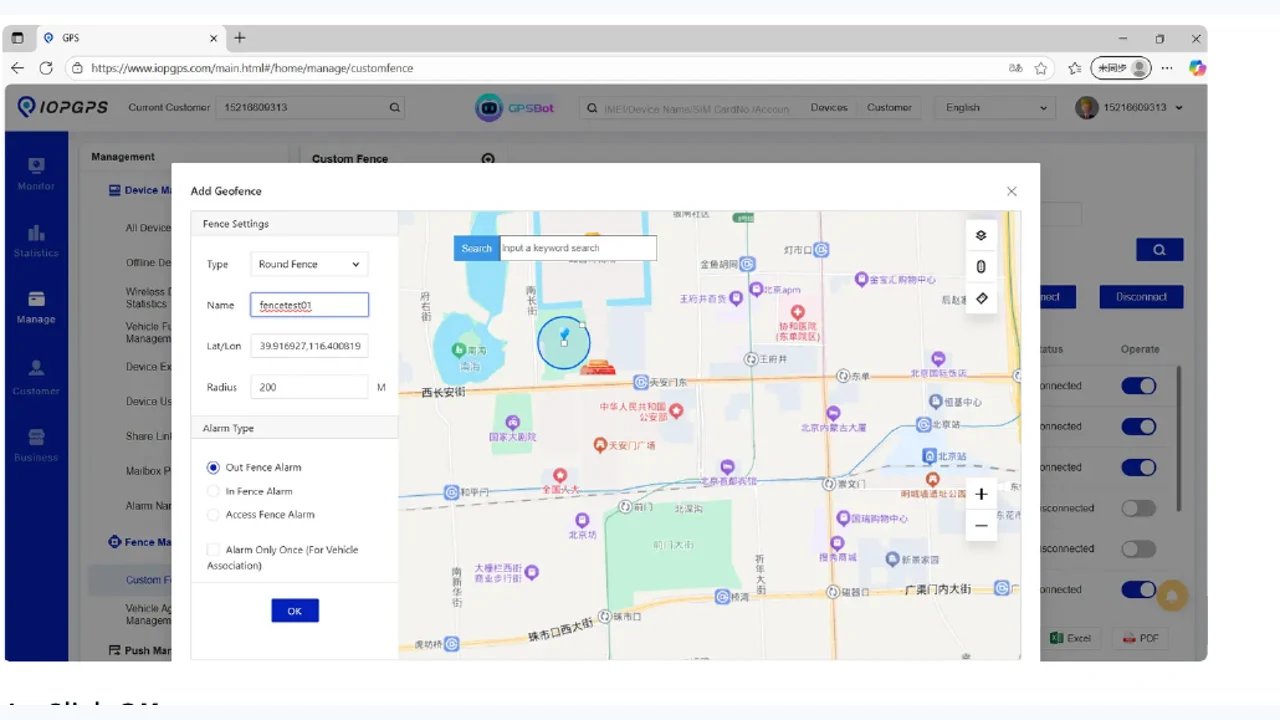
Create circular or polygon areas and configure enter, exit, or combined event rules.
IOPGPS supports configured geofences, alarms, notifications, and task or event workflows so authorized teams can review exceptions and coordinate follow-up.
Alerting is most useful when device capability, account permissions, notification preferences, operating rules, and escalation workflows are defined together.
Event Handling Summary
Event handling links vehicle events to rules, notifications, team review, and permitted follow-up actions.
Event Workflow
Event Capabilities
Create circular or polygon areas and configure enter, exit, or combined event rules.
Surface supported device and workflow events for authorized users.
Route event context through configured notification workflows.
Support operational review and coordinated follow-up around configured events.
Review alarm and workflow context from the IOPGPS mobile app.
Geofence and Alarm Context
The alert visual uses an approved IOPGPS geofence setup screen so the page reads as event handling, not general map monitoring.
Event Users
Recovery and asset-protection teams that need event context.
Fleet teams that need unauthorized movement, geofence, overspeed, offline, or ignition-related alerts when supported.
Partner operations teams that need repeatable notification and follow-up workflows.
Event and Notification Rules
Which events should generate alarms or notifications?
Which teams should receive and review each event type?
Which actions are allowed for each device, account, and operating scenario?
Device and Data Dependencies
Geofence-capable location data
Device event and alarm support
Sensor or ignition data where required
User permissions and notification settings
Deployment Considerations
Supported alert types depend on device model, protocol, wiring, sensors, and available data.
Notification routing depends on account configuration and user permissions.
Sensitive actions are configured according to device capability, customer policy, operating requirements, and applicable legal and safety controls.
Customer Proof
A Brazilian vehicle security provider used IOPGPS to support faster recovery coordination across 5,000 connected security vehicles.
IMIP used a customized IOPGPS environment to digitize industrial fleet operations across 7,000 connected vehicles.
IOPGPS supports configured alarm notifications, geofence events, and task or event workflows for operational review and coordinated follow-up.
Yes. IOPGPS supports circular and polygon geofences, including enter, exit, and combined event rules.
No. Available alert types depend on device model, protocol, wiring, sensors, available data, permissions, and deployment configuration.
Yes. Alerts can support recovery-readiness workflows when configured with the right devices, permissions, procedures, and legal and safety controls.
Last updated July 25, 2026.